
Aspen Implementation
MyFlexLearning’s flexible scheduling tool integrates directly with Follett’s Aspen Student Information System, so your Aspen master schedule and your flex block scheduling work together instead of living in two disconnected systems.
Here’s how it works: your school creates a time in the Aspen bell schedule for flex block, then builds out offerings and daily schedules inside MyFlexLearning. From there, data flows securely between the two systems every day, so teachers, staff, and students always know where everyone should be.
This integration is the result of an official partnership between Follett School Solutions and MyFlexLearning, first announced in 2021. Schools using both systems consistently describe the implementation as easy and the data syncing as seamless.
What Data Syncs Between Aspen and MyFlexLearning
Data is shared securely from Aspen to MyFlexLearning on a daily basis, including:
- Student and staff information
- Daily attendance
- Schedule data
- Grades
MyFlexLearning sends flex block data back to Aspen for visibility by school staff, and optionally through the Family Portal, so families can see how students are spending their flex time too.
See Flex Schedules Right in Aspen
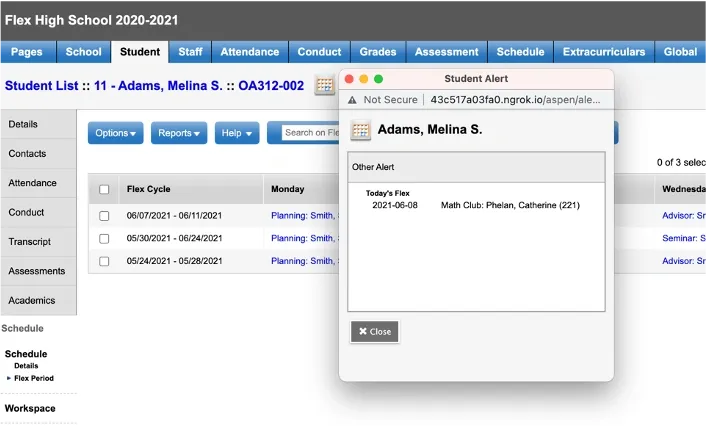
Aspen customers also have the option to use Aspen’s custom navigation to surface the flex schedule directly inside Aspen. If your school chooses this setup, MyFlexLearning helps you configure a side tab showing each student’s flex schedule, giving staff and portal users visibility without leaving Aspen. This is optional and not required for the integration to work.
Front office staff who use this optional custom alert can quickly locate a student during their flex block without needing to search another system.
What Data Moves Between Aspen and MyFlexLearning
Here’s a closer look at what gets shared during implementation and why each piece matters:
Student and Staff MyFlexLearning needs very little student and staff data to function: names, email addresses for Google Authentication, and a few supporting fields. It also needs the established relationship between each student and their Advisor or Homeroom Teacher, so students load correctly into Advisories if your school offers them.
Daily Attendance Just as in Aspen, when a classroom teacher takes attendance, they can reference Daily Attendance to see whether a student is present or absent. MyFlexLearning displays that day’s attendance from Aspen right on every class roster.
Schedule and Grades Academic teachers can pull a student into their own flex block offering more easily when they can see the student’s class roster from Aspen, so that comes in too. MyFlexLearning also brings in each student’s Current Term Average from the gradebook, so teachers can quickly identify who needs intervention and in which subject.
Rooms During implementation, your school’s classrooms are set up as available spaces for flex block offerings, with an import that avoids hand-typing every room. You can still manually add any rooms not already listed in Aspen.
An Official Follett Partnership
Follett School Solutions and MyFlexLearning announced an official partnership to integrate Aspen SIS with MyFlexLearning’s flexible scheduling platform. Aspen SIS is used by more than three million students across 298 school districts in the U.S. and Canada, and this partnership means Aspen and MyFlexLearning are built to work together, not bolted together after the fact.
MyFlexLearning was also founded by Aspen alumni, so the integration was built by a team that already knew the platform inside and out.
Download our free implementation guide to learn what it takes to implement a flex block at your school.